On behalf of our entire team at Ex Machina Soundworks, thank you for choosing Terra, and welcome to the family. Whether you use it as a professional tool, for your own listening pleasure, or maybe even for a bit of both, we are confident it will reward you with a level of accuracy and realism that will redefine what you come to expect from a loudspeaker.
To activate your extended warranty, and to receive product updates, please register your serial number at exmachinasound.com/support/register.
Important Safety Information
Please read the following safety instructions before setting up your system. Keep the instructions for further reference. Please heed the warnings and follow the instructions.
⚡ Caution: To reduce the risk of electric shock, do not open the loudspeaker. There are no user-serviceable parts inside. Refer servicing to your dealer or qualified service personnel.
⚡ Ensure that the specified voltage matches the voltage of the power supply you use. Terra uses an auto-switching power supply and will automatically adapt to 110/220V power operation. If you have reason to believe this is not the case, do not connect the loudspeaker to a power source. Please contact your dealer or distributor to resolve this issue.
⚡ This product, as well as all attached extension cords, must be terminated with an earth ground three-prong AC mains power cord like those supplied with the product. To prevent shock hazard, all three component contacts must always be used.
⚡ Always switch off your loudspeakers before connecting or disconnecting any cables. Never turn your system on after you've turned your speakers on. Doing so can result in damage to the loudspeaker.
⚡ To completely disconnect from AC mains, unplug the power supply from the power socket. The loudspeaker should be installed near the mains connection, and you should ensure easy access to the power socket to disconnect the device if necessary.
⚡ Protect the power cord from being walked on or pinched, particularly at the connectors and sockets, as well as at the rear of the loudspeaker.
⚡ Unplug this loudspeaker during lightning storms or when unused for long periods of time. Always keep electrical equipment out of the reach of children.
⚡ Do not expose this product to rain or moisture, never wet the inside with any liquid and never pour or spill liquids directly onto this unit. Please do not put any objects filled with liquids onto the speaker.
⚠ Use only with stands that are rated to handle the weight of your loudspeaker. Additionally, make sure the stand you use is able to support the physical dimensions of the loudspeaker. Please take proper precautions when lifting the loudspeaker into place. Failing to take these precautions can result in personal injury.
⚡ Always ensure your cables are tested. Bad or defective cables can harm your loudspeakers as well as result in the introduction of noise, hum, crackling, etc.
⚠ Avoid using flammable or combustible chemicals for cleaning any audio components.
⚠ Install in accordance with the instructions explained in this manual.
⚠ Never expose this product to extremely high or low temperatures.
⚠ Never operate this product in an explosive atmosphere.
⛔ BE AWARE: High SPL can damage your hearing! Please avoid getting too close to the loudspeakers while using them at high volumes.
⛔ DO NOT TOUCH THE TWEETER! Doing so will result in a replacement charge, as it will not be covered under your warranty. Additionally, be aware that the drivers in this loudspeaker emit a magnetic field, and can subsequently be damaged by magnetic items such as rings, necklaces, etc. Please keep all magnetically sensitive items at least 1.5 feet (0.5m) away from the loudspeaker.
⚠ You must ensure free airflow behind the speaker to maintain sufficient cooling, with a minimum distance of at least 4 inches (100mm) to any wall.
⚠ Avoid exposing the loudspeaker to any open flame.
⚠ Do not expose the loudspeaker to water. Do not set up the loudspeaker near a water source.
⚠ Use a dry cloth or duster for cleaning. Be careful not to touch the tweeter with any rough or rigid material. Doing so can damage the tweeter.
⚠ Do not install near any intense heat sources such as radiators, hot air vents, stoves, or other equipment (including amplifiers) that produce heat.
⚠ Do not disconnect the ground wire in the plug. An earthed plug has live and neutral prongs, plus a third prong for grounding purposes which is included for your safety. If the provided plug does not fit into your socket, consult an electrician to have the socket replaced.
⚠ Only use attachments/accessories specified herein.
⛔ All servicing must be performed by qualified service personnel. Servicing is required when the loudspeaker has been damaged in any way, e.g. if the power-supply cord or plug is damaged, liquid has been spilled or objects have fallen into the individual drivers (such as fingers, necklaces), careless handling, or if the loudspeaker has been exposed to rain or moisture, does not operate normally, or has been dropped.
⚠ Allow approximately 60 seconds after powering on for the system, DSP and control software, to fully initialize. Avoid power-cycling the unit during this window.
Key Features
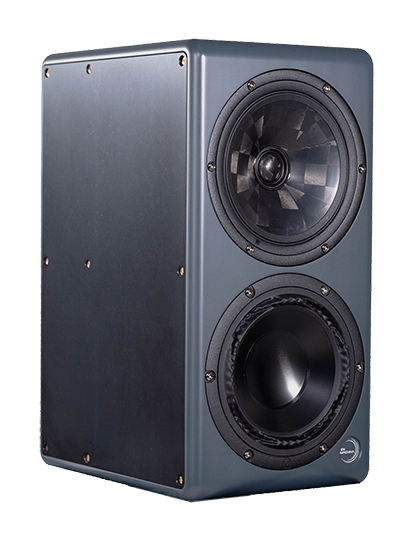
Coaxial Midrange/Tweeter
Terra's 18cm coaxial midrange/tweeter is the third generation of our ongoing design collaboration with SEAS, built on the SEAS C18 platform, with Composite Sound diaphragm technology carried through to this generation.
- Custom Composite Sound TPCD diaphragms, third generation, with an improved fiber layup over the previous generation.
- An FEA-optimized hybrid motor structure brings total harmonic distortion down to 0.2% power average at 90dB.
- Automated fiber placement pushes tweeter breakup above 40kHz. DSP limits high-frequency extension to 30kHz for optimal performance.
- A thin-lip, fully underhung surround eliminates the on-axis phase cancellation that plagues most coaxial drive units. The waveguide geometry loads the tweeter correctly while maintaining the point-source acoustic center that gives Terra its imaging precision.
Woofer
Terra's low-frequency driver is an 18cm PuriFi PTT6.5W96-08 with custom modifications. We specified concave aluminum diaphragms in place of PuriFi's standard convex dust cap: Terra doesn't need the dispersion behavior that shape provides, so bending stiffness was prioritized for the low frequencies where this driver operates. PuriFi's hybrid motor structure combines ceramic bulk flux with neodymium bucking sleeves to focus flux in the gap, and the driver's surround geometry allows near-perfect symmetry on both sides of the stroke, the way a suspension performs equally well moving forward and backward. Uneven stiffness creates harmonic distortion and compression artifacts; this symmetrical design delivers fast settling time and exceptional linear excursion without those distortions.
Both drivers are measured individually and linearized at the driver level before crossover application, ensuring the acoustic output matches the DSP's expectations precisely.
Cabinet
Each Terra cabinet starts as a single aluminum extrusion with 16mm solid outer walls and 9mm integral internal cross-braces, all part of the same extrusion formed into a monocoque shell massive and stiff enough that driver back-pressure cannot induce ringing, even at full output.
The side panels are Durasein, a solid surface material chosen for its ATH fill percentage, which provides the acoustic impedance mismatch to the aluminum shell needed to prevent panel recoupling. Fasteners are A4-70 austenitic marine stainless steel with a TiAlN (titanium aluminum nitride) PVD coating in a rose gold finish, mounted on 60A silicone gaskets and torqued to spec to maintain that impedance mismatch throughout the assembly.
The cabinet's outer shape follows golden ratio proportions for baffle step behavior, while the internal acoustic enclosures are deliberately cuboid, allowing precision targeting of specific modal frequencies with metamaterial absorbers. Inside the coaxial chamber, a rigid plate over a gradient impedance involuted gyroid bed targets the cabinet's axial mode frequencies directly: untreated, those modes peak at approximately 12dB; with the absorbers installed, they are unmeasurable. The woofer chamber uses traditional fiber fill, since its enclosure is small enough that primary modes sit well above the driver's operating range.
Amplifiers
Terra uses Hypex NcoreX amplification: a single two-channel NCx252MP module drives the woofer and midrange, with a dedicated NCx102MP module powering the tweeter. The measured sum of all harmonic distortion from the entire electronics chain sits well below the acoustic distortion of the drivers themselves, so the electronics contribute negligibly to what you hear; the physical limitations of moving air set the distortion floor.
DSP & Conversion
Terra runs third-generation Peregrine DSP architecture on an Analog Devices ADSP-21569 SHARC+ processor, with an ESP32 co-processor handling WiFi control. Conversion is handled by AKM's AK4493SEQ DAC and AK5572EN ADC.
This generation introduces living calibration: independent, phase-summed level corrections for each transducer, measured and applied individually rather than interpolated from a single sine sweep. Each Terra is individually measured and calibrated before it ships. Both drivers are linearized separately, then zero-phase crossovers are applied at 200Hz and 2kHz. The result is ±1.5dB frequency response and ±15° phase deviation across the entire operating range (30Hz–30kHz). Because every unit is calibrated to the same target, any two Terras act as a matched pair.
The ESP32 co-processor also delivers periodic remote updates to DSP corrections as our measurement data and calibration algorithms improve, so a given pair of Terras continues to improve after it ships.
Initial Setup
Unboxing
Inside each box you should find:
- One Terra loudspeaker
- One 6-foot IEC power cable
- One quick start welcome packet
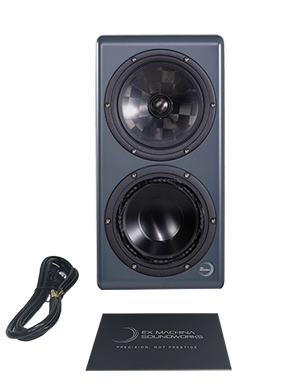
Please observe the following steps to safely unpack your loudspeaker:
- Begin by placing the box sideways with the widest side down.
- Cut the tape from the bottom of the box.
- Fold the bottom box flaps against the rest of the box, tucking the flap that is towards the floor underneath the box.
- Stand the speaker back up on the now open bottom of the box.
- Lift the box away from the speaker and foam clamshell inside.
- Remove the quick start welcome packet and IEC power cable from the top cavities of the foam clamshell.
- Lay the foam clamshell on its side.
- Remove the top half of the clamshell.
- Lift the speaker out of the lower half of the clamshell.
- PLEASE DO NOT TOUCH THE TWEETER! (While Composite Sound TPCD diaphragms are mechanically robust, physical damage resulting from a strike will result in a replacement charge, as it will not be covered under your warranty.)
Initial Speaker Placement
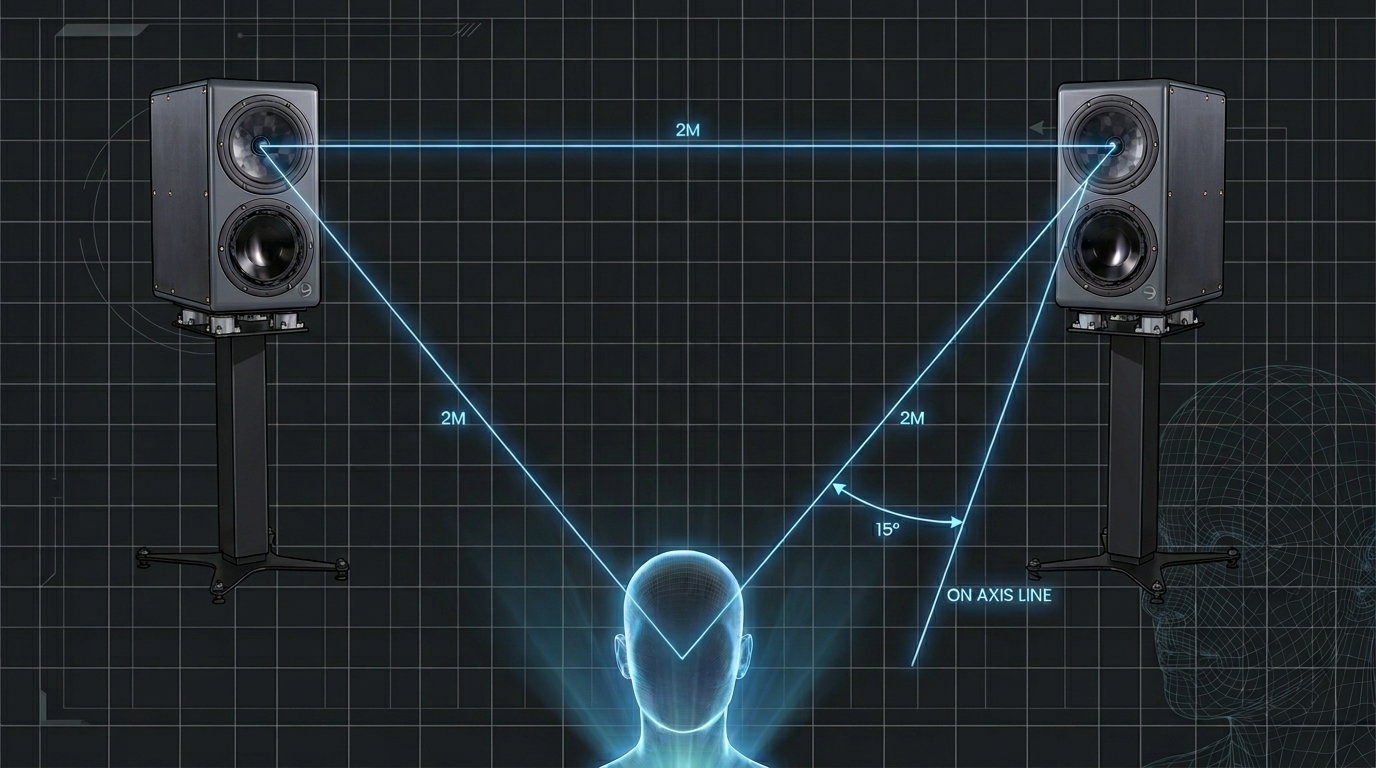
Because of Terra's coaxial coverage and wide sweet spot, Terra is fairly forgiving of relative room placement. For fully optimal performance, however, we recommend the following:
While optimal speaker spacing and listening depth can vary based on the acoustics of your room and your own listening preferences, we recommend starting with the standard "equilateral triangle" approach. However, when adjusting toe-in, we suggest aligning your primary listening position no more than 15° off-axis from the direct tweeter angle on either side. Terra's 90° x 90° coaxial coverage means the equilateral triangle setup is a starting point, not a requirement, for a wide, accurate sweet spot.
To avoid coupling resonance and low frequency deterioration, we recommend installing Terra on high quality stands with load appropriate decoupling. Our preferred solution is the spacelab.systems LiFT. Where stand mounting is not possible, we recommend a decoupling solution such as IsoAcoustics ISO-pucks.
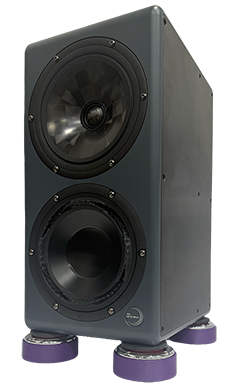
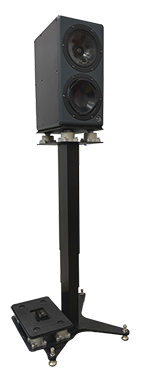
Because of its coaxial, point-source design, Terra can be oriented either horizontally or vertically with no adjustments necessary. However, for proper imaging and stereo separation, please ensure the speakers are at least 4 feet apart tweeter to tweeter. Terra also retains its phase coherence and phantom center as close as 8 inches from the front of the cabinet, so it can be worth experimenting with near-field listening positions that may help mitigate the effects of poor room acoustics.
Where possible, place the loudspeakers symmetrically in your room, ideally at least three feet from rear and side walls. Boundary control adjustments are available via Houston for half and quarter space loading, but Terra performs best in full space conditions.
Connections & Controls
Terra will work as is out of the box. If you want to access additional features and controls, you will need to connect Terra to your local WiFi and pair it with Houston, our control app. A quick start guide for WiFi setup is included in your welcome packet, and is also available at exmachinasound.com/launchpad. The full Houston manual lives at exmachinasound.com/support/manuals.
Physical Connections
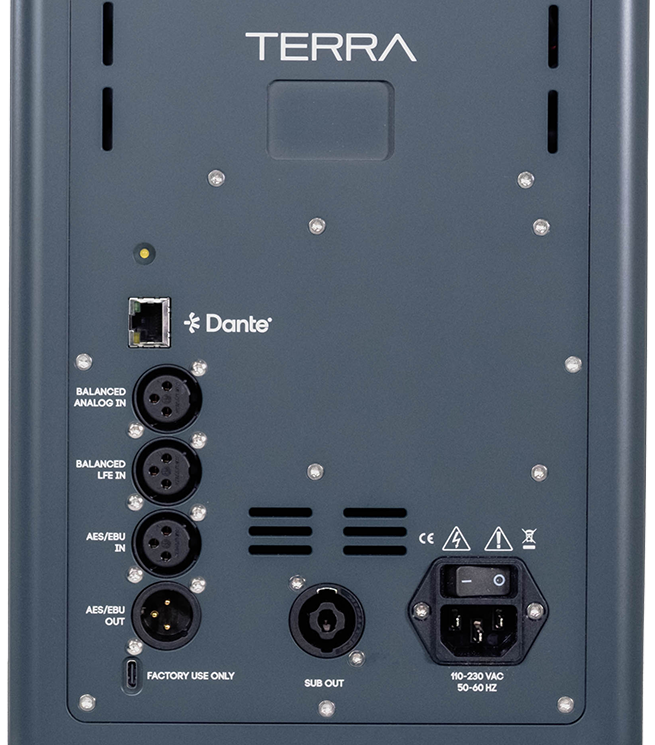
- IEC Inlet. Terra uses an auto-switching power supply and will automatically adapt to 110/220V power operation. Should you ever need to replace the provided IEC cable, please ensure you use a properly grounded, 3-prong IEC of at least 16AWG. Never use a 2-conductor power cable or leave the ground disconnected.
- Power Indicator. A white LED indicator on the rear panel will illuminate when the loudspeaker is switched on and operational.
- Analog XLR Input. Balanced analog input, nominal full scale level of 2Vrms. Do not overload the input stage for extended periods of time.
- LFE XLR Input. A dedicated balanced input for low frequency effects content, separate from the main analog input, for home theater and immersive bass management applications.
- AES XLR Input. Balanced AES/EBU digital input.
- AES XLR Output. Balanced AES/EBU digital output.
- Ethernet. For the optional Dante expansion card. Not active without the card installed.
- USB-C. For firmware updates and servicing only. This input cannot be used for USB audio.
- 4-Pole Speak-On Output. Powers a connected Gravity subwoofer pair directly from Terra's rear panel. Not used when Gravity is not present.
Houston App Controls
All processing, calibration, and system configuration on Terra is handled through Houston, rather than physical rear-panel switches. Available on Terra standalone:
- Channel mute
- Polarity / phase flip
- Input switching
- Input sensitivity control
- Equalization (Tilt EQ is planned for a future software update)
- Boundary control (half and quarter space compensation)
- Low latency mode
- Scene / configuration presets
- Over-the-air firmware and calibration updates
The following controls become available once a Gravity subwoofer pair is connected:
- Delay compensation
- Subwoofer gain trim
- Sub mute
Technical Specifications
| Performance | |
|---|---|
| Frequency Response | ±1.5dB 40Hz–30kHz (F6 at 30Hz) |
| Phase Response | ±15° 30Hz–30kHz |
| Max SPL @ 1m | 108dB @ 1kHz |
| Max LF SPL @ 1m | 100dB @ 50Hz |
| THD+N (90dB @ 1m) | <0.2% 100Hz–30kHz |
| Coverage Pattern | 90° x 90° conical |
| Driver Complement | |
|---|---|
| Coaxial Mid/HF | 18cm, SEAS C18 |
| Woofer | 18cm PuriFi PTT6.5W96-08 |
| Crossovers | |
|---|---|
| LF/Mid | 200Hz, zero-phase LR4 digital |
| Mid/HF | 2kHz, zero-phase LR4 digital |
| Amplification | |
|---|---|
| Woofer | Hypex NCx252MP |
| Midrange | Hypex NCx252MP |
| Tweeter | Hypex NCx102MP |
| DSP & Conversion | |
|---|---|
| DSP | ADSP-21569 SHARC+ |
| Co-processor | ESP32 |
| DAC | AKM AK4493SEQ |
| ADC | AKM AK5572EN |
| Input | |
|---|---|
| Sensitivity | 2Vrms to full scale |
| Power | Auto-switching 120/240V |
| Mass & Dimensions | |
|---|---|
| Dimensions | 406 x 280 x 203mm (16x11x8") |
| Weight | 21.8kg (48 lbs) each |
Warranty & Servicing
- Ex Machina Soundworks, LLC warrants new products against defects in materials and manufacturing for a period of 2 years from the date of purchase. Register your product within 60 days of purchase to extend this coverage to 6 years from the date of registration.
- The warranty is tied to the product, not the customer, and is transferable.
- During the warranty period, Ex Machina Soundworks will repair or replace a faulty unit (per our discretion).
- Warranty repairs must be carried out by either Ex Machina Soundworks or an authorized repair center, with the exception of driver units, which are field replaceable.
- You must contact your authorized dealer or Ex Machina Soundworks to initiate a warranty claim.
- Ex Machina Soundworks' liability is with its authorized dealers. Contact with the end user may occur, but the warranty claim must be referred to an authorized dealer. Until the product has been inspected, or determined to be in defect by Ex Machina Soundworks' service department, we will admit no liability.
- No warranty will be honored without a valid serial number.
- In the case of a warranty claim, the product or components must be returned to the factory at the customer's expense.
- If the warranty claim is accepted, shipping costs incurred will be reimbursed by Ex Machina Soundworks.
Questions about your system? Visit support or contact your dealer.
Visit Support